
Narinig Mo Ba
Narinig Mo Ba: A Listening-First Guide to the Shop Story
Narinig Mo Ba is a browser game that turns a small neighborhood store into a study in attention. The opening illustration looks like a simple street scene, with a red ColaSoda sign, houses, utility poles, and two wooden menu buttons. Once the game moves behind the shop window, the player sees a wire grid, a counter, hanging sachets, a fridge, and a customer called Junjun. The pressure comes from the contrast between routine work and dialogue that feels increasingly personal.
This version of the guide is centered on listening, visual memory, and the moment-to-moment difference between a speech box, a choice panel, and a product prompt. It is intentionally different from a conventional level walkthrough because the running build is better understood as a short interactive story. You can play the exact embedded HTML build above, then return here to compare the visual state you reached.
The first minute: establish a reference point
Start the game from the illustrated menu and allow the DAY 1 transition to complete. The initial shop frame is wide enough to show several landmarks at once. Mr Pogi occupies the left side. The neighborhood appears through the wire window. Products and action prompts occupy the lower half. Before you make an input, take one quiet look at the whole arrangement.
This first look gives you a reference point for later changes. The wire grid is especially useful because it remains visible behind characters, product prompts, and dialogue boxes. The counter edge gives you a second horizontal marker. The product group at the right gives you a third. When the screen darkens for dialogue, these landmarks remain faintly visible, allowing you to tell whether the game has changed the scene or simply placed a new layer above it.
The game rewards players who notice the layer change. A product action belongs to the counter. A story action belongs to the speech or choice box. If you treat both as one undifferentiated clickable picture, the first minute can feel inconsistent. If you identify the active layer before clicking, the interaction becomes much more predictable.
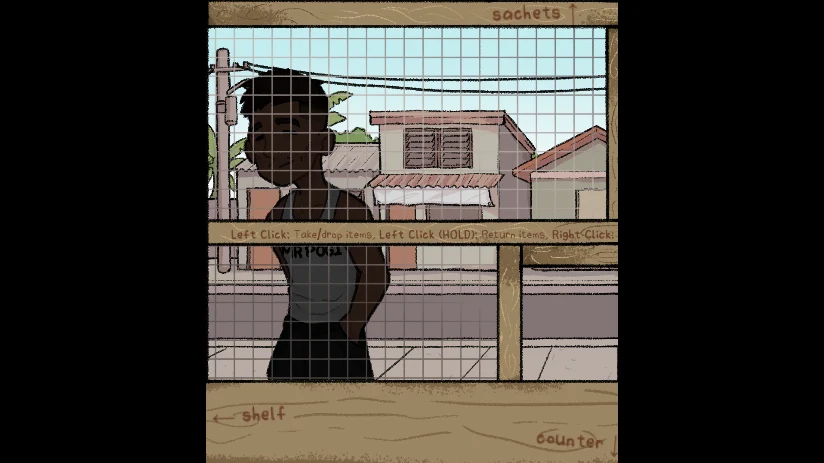
How to play narinig mo ba in a browser
Wait until the Godot loading screen has finished and the menu artwork is visible. Click START once. During the DAY 1 card, wait rather than clicking around the canvas. After the shop appears, click inside the frame so the pointer belongs to the game. This matters when the browser has just loaded an iframe or when you have clicked outside the canvas.
The build is small enough to play in one browser session, but the art contains handwritten labels and small dialogue text. A larger desktop window makes the store map easier to read. On a phone, rotate to landscape if possible. If the game does not respond after loading, focus the canvas and try the displayed action again before reloading the page.
The browser format is part of the appeal of Narinig Mo Ba. There is no separate installer on this page, and the HTML build opens inside the player area. Keep the page open while you read the guide so you can test one observation at a time. A clean reload is preferable to a long series of uncertain clicks during the opening transition.
Three interaction layers to memorize
The game presents three different interaction states. The first is the shop state. Here, the counter and products are active. The second is the cream dialogue state. A character speaks, and a small click-to-proceed instruction appears inside the box. The third is the gray choice state. The background is dimmed and a response is presented as a large selectable panel.
The shop state asks for visual scanning. Look at the product positions and the handwritten labels. The dialogue state asks for reading. Finish the line before you proceed. The choice state asks for interpretation. Read both the prompt and the response, then decide what the line means for the relationship on screen. This three-part model is more useful than a list of random clicks because it tells you what kind of attention to use.
The lower-right counter also introduces a fourth detail: the item prompt. Get Item and Return Item appear close to products. A normal click can take or drop an item, while holding the left button is used for returning. Right click is used for checking a price. The prompt is easy to miss when a character or speech box is present, so wait until the story layer has cleared before testing stock.
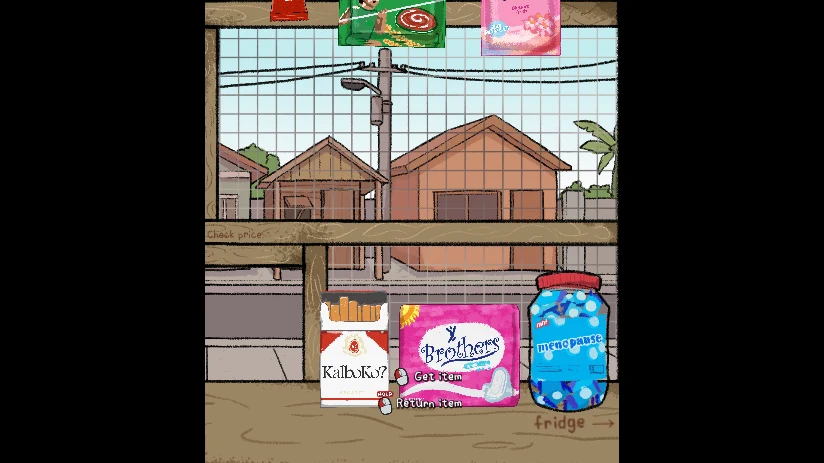
The Junjun exchange, read as a sequence
An early Junjun line asks for a stick of coffee. It is an ordinary request that gives the player a concrete object to identify, yet the presentation makes it more than a shopping instruction. The customer’s name is shown in the speech box, the background is kept visible, and the small proceed marker asks you to stay with the sentence.
After the first line, the game can place the player in a choice about debt. That transition changes the task from locating an item to reading a social boundary. Do not rush from the coffee request straight into another product click. Advance the dialogue, inspect the choice panel, and wait until the shop layer returns.
The next exchange can mention 50 pesos. This line is valuable for replay because it creates continuity between the earlier request and the later response. You can use it as a checkpoint in your own route notes: coffee request, debt prompt, selected response, then the 50-peso line. The exact order of what you see may depend on the input path you choose, so record the wording rather than relying on memory alone.
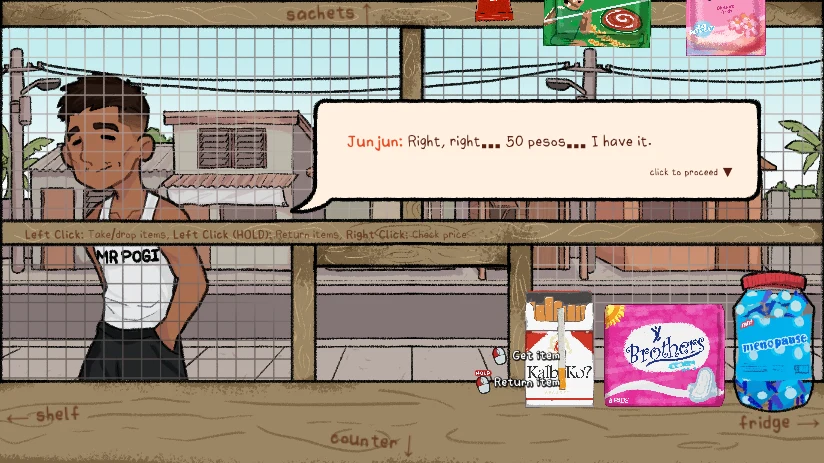
How to read a branch without guessing
One visible choice reads, “You know what? Don’t bother Junjun.” The sentence is short, but it is not a generic continue button. It is a character response. When replaying, write down the response exactly and compare the shop state after the selection. Look for changes in which character is visible, whether the item prompt remains, and whether the next dialogue is immediate or delayed.
Branch tracking works best with three notes. First, record the line that appeared before the choice. Second, record the selected text. Third, record the first visual state after the choice. A note such as “50 pesos line → don’t bother response → counter returns with item prompts” is enough to distinguish one route from another. You do not need a complicated flowchart for a short story, but you do need more than a vague memory of having clicked something near the center.
Avoid assuming that a darker screen means a fail state. The game dims the shop behind choice panels to focus attention. It also uses dark transitions around scene changes. Check for readable text or a new prompt before deciding that the game has stopped. If an input truly fails, click the canvas once and repeat the single intended action.
Inventory handling as a story mechanic
The item system is deliberately physical. Products sit on the counter rather than inside a detached menu. This forces the player to connect an instruction with a place: a cold drink belongs near the fridge, a package may sit on the counter, and a request sends you back to the store view. That layout gives the game a modest simulation feel without turning it into a full management game.
Use right click to inspect before taking an item. If the prompt offers Get Item, decide whether the object matches the current request. If you change your mind, hold the left button to use Return Item. The difference between clicking and holding is important because it prevents every pointer action from becoming the same command.
The counter can become visually busy when a dialogue has just finished. Let the character line disappear, identify the product group, then act. This pause is also a way to preserve the narrative rhythm. Narinig Mo Ba wants you to move between listening and handling, not to mash both at once.
A replay method for the quiet horror tone
On the first run, do not optimize. Learn the opening screen, the shop landmarks, the location of Mr Pogi, and the position of the visible products. Let the dialogue play out and write down the words that feel like route markers. The goal is to understand what the game is asking you to notice.
On the second run, deliberately separate your actions. Begin with a full-screen visual scan. Read the first request. Advance one dialogue layer. Read the choice. Return to the shop. Only then interact with the counter. This makes it easier to see whether a later state is caused by your story response or by an item action.
On a third run, focus on sound and timing. Keep the volume on and listen during the quiet portions between clicks. The title asks whether you heard something, and the game’s tone depends on the player being willing to notice small shifts. Do not fill every pause with input. A short wait can be informative when the scene is designed to let a line or transition land.
What to do when the screen feels confusing
First, locate the three landmarks: Mr Pogi on the left, the wire window across the middle, and the product group on the lower right. Second, decide whether the screen is a shop, dialogue, or choice state. Third, read the active prompt. This procedure removes most uncertainty without restarting.
If the browser appears to ignore a click, the likely causes are focus, loading, or an active transition. Click inside the canvas, wait for a frame, and try the same action once. Avoid changing several variables simultaneously. If you reload, wait for the Godot loader and the illustrated menu before starting again.
If text is hard to read, enlarge the browser window or use landscape orientation. Aggressive page zoom can cut off the canvas edges and make the pointer positions less reliable. The game itself is easier to read when the full store view remains visible.
Narinig Mo Ba FAQ
What is narinig mo ba?
It is a browser story game set around a hand-drawn neighborhood shop, with product handling, customer dialogue, and a tense exchange with Junjun.
How do I start narinig mo ba?
Wait for the Godot loader, click START on the illustrated menu, and let the DAY 1 transition finish before using the shop controls.
What does the 50-peso line mean?
It is a later Junjun dialogue line that links the customer exchange to the earlier request and provides a useful replay checkpoint.
How do I handle an item?
The shop shows Get Item and Return Item prompts. Left click takes or drops an item, held left click returns it, and right click checks a price.
Why is the background dimmed?
The game dims the shop when a choice panel is active so the response becomes the primary interaction layer.
Can I play without downloading the game?
Yes. The page loads the HTML build directly inside a browser iframe.
Closing route notes
The most reliable way to play Narinig Mo Ba is to treat attention as a control. First look at the entire shop. Then identify the active layer. Read the words that appear. Only after that should you take, return, or inspect an item. Junjun’s coffee request, the debt prompt, the 50-peso line, and the “Don’t bother Junjun” response form a practical set of landmarks for understanding the opening exchange.
The game remains effective because its space is small and its signals are precise. A wire grid, a product prompt, a short sentence, or a pause can change how the next click feels. Play slowly enough to notice those signals, and use each replay to remove one uncertainty from your route.
This Nate Hand Gesture page embeds the Narinig Mo Ba HTML build from https://html-classic.itch.zone/html/18497771/index.html?v=1785020130.